
Download Video Screen Lock free – Secure Mac Screen‑Lock Tool, Free & Easy
Overview
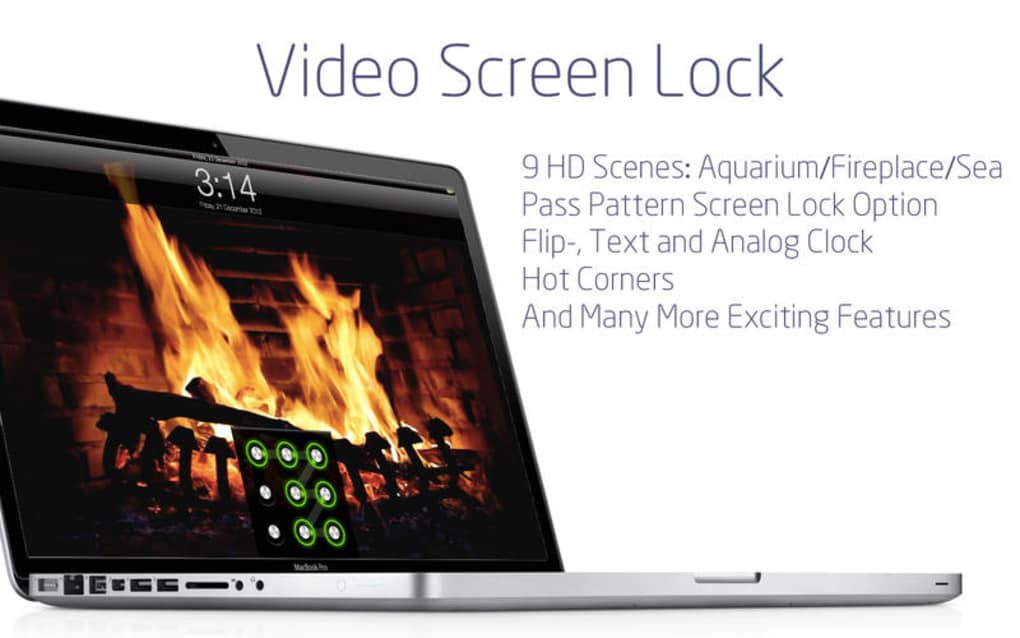
Video Screen Lock free is a lightweight, no‑cost utility designed exclusively for macOS. Positioned in the Science & Education category under the playful sub‑category “Funny Things,” the app lets you turn any video file into a dynamic lock screen. Whether you want a looping clip of your favorite pet, a short tutorial, or a promotional teaser, Video Screen Lock free transforms the video into a secure screen‑locker that activates whenever you step away from your Mac.
The current version 2.1, released on 1 April 2017, remains fully compatible with macOS 10.9 and newer. Although the install size isn’t publicly disclosed, the program’s minimal footprint ensures it won’t slow down your system. The interface is deliberately simple: drag‑and‑drop your video, set a lock timeout, and let the app handle the rest.
Because it’s free, there are no hidden subscription fees or trial periods, making it an ideal choice for students, educators, or anyone who enjoys adding a touch of personality to their desktop security.
Key Features
- Video‑Based Lock Screen: Convert any MP4, MOV, or AVI file into a live lock screen background.
- Automatic Activation: The app monitors idle time and locks the screen instantly when the user steps away.
- Customizable Timeout: Choose from 30 seconds to 10 minutes before the lock engages.
- Loop Playback: Seamlessly loops the selected video without noticeable pauses.
- Lightweight & Secure: No background daemons, minimal RAM usage, and runs with standard user permissions.
- Free & Ad‑Free: Completely free to download, with no in‑app purchases or ads.
- English Language Support: All menus and prompts are in clear English.
Installation & Usage Instructions
Step‑by‑Step Installation
- Visit the official download page and click the Download Video Screen Lock free button.
- Once the .dmg file finishes downloading, double‑click it to mount the installer.
- Drag the Video Screen Lock free icon into your
Applicationsfolder. - Open the app for the first time; macOS may prompt you to confirm that you trust the developer—click Open.
- The app will request permission to control your screen. Grant this access in System Settings → Security & Privacy → Privacy → Screen Recording.
How to Use the App
After installation, launch Video Screen Lock free from the Dock or Launchpad. You’ll see a clean window with three main sections: Video Selection, Timeout Settings, and Start Lock. Drag a video file into the designated area or click Browse to locate it on your Mac.
Choose your preferred idle timeout from the dropdown menu, then press Start Lock. The app runs silently in the menu bar, ready to lock your screen with the chosen video whenever you become idle. To stop the lock, click the menu‑bar icon and select Disable Lock.
The entire process takes less than a minute, making it ideal for quick setups before a meeting or study session.
Compatibility
Video Screen Lock free is built for macOS and supports the following versions:
- macOS 10.9 Mavericks
- macOS 10.10 Yosemite
- macOS 10.11 El Capitan
- macOS 10.12 Sierra
- macOS 10.13 High Sierra
- macOS 10.14 Mojave
- macOS 10.15 Catalina
- macOS 11 Big Sur
- macOS 12 Monterey
- macOS 13 Ventura
Pros and Cons
What Users Love
- Completely free with no hidden fees.
- Unique ability to use personal videos as a lock screen.
- Very low system resource consumption.
- Simple drag‑and‑drop interface.
- Works reliably across many macOS versions.
Areas for Improvement
- Lack of detailed documentation on supported video codecs.
- No built‑in video editor for trimming clips.
- Only English language support; localization could broaden the audience.
- Occasional delay on older Macs when looping high‑resolution videos.
- No mobile (iOS/Android) companion app.
Frequently Asked Questions
Is Video Screen Lock free safe to use on my Mac?
Yes. The app is signed by a verified developer and does not require elevated privileges beyond screen‑recording access, which macOS already restricts. It runs as a regular user process and does not modify system files.
Can I use a video from YouTube or other streaming services?
The app only accepts local video files. To use online content, first download the video in a compatible format (MP4, MOV, AVI) using a reputable downloader, then import it into Video Screen Lock free.
What video formats are supported?
Common formats such as MP4, MOV, and AVI work out of the box. If a video fails to load, converting it to MP4 with H.264 codec usually resolves the issue.
Will the app affect my Mac’s battery life?
Because the lock screen runs only when the computer is idle, the impact on battery is minimal. Looping high‑resolution videos may use a bit more power, but the difference is generally negligible.
Is there a way to schedule the lock screen for specific times?
The free version does not include scheduling. However, you can manually enable or disable the lock through the menu‑bar icon whenever needed. Advanced scheduling is planned for a future paid edition.
Conclusion & Call to Action
Video Screen Lock free delivers a quirky yet practical solution for macOS users who want to personalize their security routine without spending a dime. Its straightforward setup, low resource usage, and the novelty of a video‑based lock screen make it stand out among traditional static‑image lockers. While the feature set is modest—lacking built‑in editing tools and broader language support—the core functionality works reliably across a wide range of macOS versions. If you’re looking for a free, secure way to add a splash of personality to your Mac’s lock screen, this app is definitely worth a try.
Ready to lock your screen with a video? Click the download button below, install Video Screen Lock free, and enjoy a more dynamic, secure desktop experience today.
Video Screen Lock free offers a fun twist on screen security for Mac users. The free price tag, simple UI, and reliable performance make it a solid choice for students and professionals alike. Minor drawbacks such as limited video editing capabilities keep it from achieving a perfect score, but overall it earns a strong 4‑star rating.







